Web-based app | For Field Adjusters

ContentsInventory

Transform photos and voice notes into structured inventory data instantly. The fastest way to document contents on-site.

Image-to-inventory AI
Voice-to-text capture
Works offline, syncs when online
9:41

Field Capture

AI-powered inventory
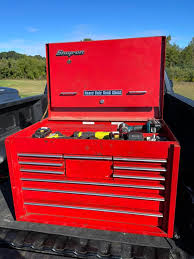
Snap-On Heavy-Duty Road Top Chest being captured
Snap-On Heavy-Duty Road Top Chest (Red)
Analyzing...
Snap-On Heavy-Duty Road Top Chest (Red)Item detected • Ready to add
Add to Inventory
Retake
Voice

Capture Faster,
Work Smarter

Everything you need to document contents in the field, built into one powerful mobile app.

Image-to-Inventory

Take a photo and our AI automatically identifies the item, suggests categories, and extracts key details.

9:41

Image to Inventory

AI-powered capture

Ninja Blender being scanned

Scanning item...

Voice-to-Text

Describe items hands-free while documenting. Perfect for fast-paced on-site inventory capture.

Voice to Inventory

Speak to add items

Tap to record

Ready to transcribe

Your dictation will appear here

Organize by Rooms

Create, manage, and edit rooms in the app. Organize items by room for easy navigation and clear reporting.

9:41

Rooms

Organize your inventory

No rooms yet

Real-Time Sync

All data syncs instantly to the cloud. Access from any device, collaborate with your team in real-time.

9:41

Syncing

Real-time cloud backup

Ready to sync

Leather Manchester Loveseat

Leather Manchester Loveseat

Pending

MacBook Pro M2 2021

MacBook Pro M2 2021

Pending

Lenovo ThinkVision Monitor

Lenovo ThinkVision Monitor

Pending

Waiting to sync

Works Offline

Continue capturing even without internet. Data syncs automatically when you're back online.

9:41
No Signal

Offline Mode

Continue capturing without internet

Working Offline

3 photos pending upload

Voice CaptureWorks Offline
Pending Photos
Waiting for connection
Leather Manchester Loveseat

Leather Manchester Loveseat

Pending

MacBook Pro M2 2021

MacBook Pro M2 2021

Pending

Lenovo ThinkVision Monitor

Lenovo ThinkVision Monitor

Pending

Capture continues offline

Three Simple Steps

From assignment to captured inventory in minutes

01

Create Assignment

Set up a new assignment which automatically syncs with the estimation portal.

02

Create Rooms

Organize your inventory by creating and managing rooms for clear structure.

03

Capture Items

Document items by taking photos or using voice input for hands-free capture.

AI Does the Rest

Our AI automatically categorizes your items, selects the right replacement matches, and prepares everything for review in Contents Estimation- where desk adjusters verify pricing and finalize the estimate.

Ready to Transform Your Workflow?

Start capturing inventory 3x faster with Contents Inventory.

30-minute call
Build your process
Custom solutions